Turn any business into a single diagram.
Turn hard-to-read AI
explanations into clear diagrams.
Convert readable Markdown and diagrams both ways. Shape them by chatting with AI, or turn pasted text and uploaded files into diagrams. Then organize them all with folders, tags, and full-text search.
One picture, shared by business and engineering.
Long AI explanations, scattered meeting notes and specs — they are hard to parse. Zukai converts them
into human-readable structured Markdown and a
diagram (SVG), both ways, and layers today and the future
((planned)) onto the same picture. Because the text is the source of truth, the diagram
always updates and never drifts.
What you can do with Zukai
-
Readable Markdown ⇄ diagram
Convert between text that reads as plain Markdown and a diagram, both ways. Edit the text and the diagram updates.
-
Shape it by chatting with AI
Just say "add this step." The AI proposes the diagram source in the right notation — you decide what to apply.
-
Paste → diagram / file → diagram
Just paste an AI's explanation. Or upload a text/Markdown/PDF file — meeting notes, a spec — and turn it into a diagram.
-
Folders, tags, full-text search
Organize with folders, label across with tags, and find any diagram by full-text search. Sort, favorite, and archive to manage many at once.
-
Share links and export
Hand off read-only access with an unguessable share link. Export to SVG / PNG / PDF — always free.
-
Cloud save and version history
Save to the cloud and follow changes through version history. Revert to any past version non-destructively — history is never lost.
Turn text into diagrams with AI
Turn hard-to-read text straight into a diagram.
Zukai's AI is a modeling partner fluent in the notation. Three entry points turn text into a diagram.
- Edit by chat — say "add an approval step to the order flow" and get a proposal back.
- Paste → diagram — drop in an AI's long output or a bullet list and get a minimal, faithful diagram.
- File → diagram — upload a text/Markdown/PDF file of meeting notes or a spec and turn it into a diagram.
Generated diagrams are always proposals — you decide what to apply. They are validated against the notation before they land.
(planned).
Apply it?
1. [Sales] sends a quote
2. [Customer] places an order
3. [Approval] (planned)
- Order flow v3 Sales
- Auth domain map DDD
- Payments: now and next Payments
Manage at scale
Manage a growing set of diagrams without losing your way.
The more your business grows, the more diagrams you have. Zukai's workspace gives you the tools to organize many diagrams and find them across the board.
- Folders sort in a tree
- Tags label across
- Full-text search matches the body
- Sort by updated / name
- Favorites to open fast
- Archive non-destructively
Three steps
-
STEP 1
Write, paste, or upload
Write in Markdown, paste an AI's explanation, or upload a document file.
-
STEP 2
It becomes a diagram
Preview on the spot. Shape it by chatting with AI; text and diagram stay in sync, always.
-
STEP 3
Save, share, manage
Save to the cloud, share by link, export to distribute. Manage them all with folders, tags, and search.
Here is what you can draw
This is Zukai itself, drawn in Zukai's own notation. The readable Markdown on the left becomes the diagram on the right.
Markdown (excerpt)
# Zukai — self model

## Domain: core conversion

A core that converts Markdown ⇄ IR ⇄ {Markdown, SVG}, both ways.
The IR is the single source of truth.

### Flow: view the diagram and edit

- Phase: use
1. [Business/planning user] writes the model in Markdown
2. Call [parse] to convert it into IR
   - send: Markdown
   - receive: IR
3. Call [render] to turn it into a diagram
   - send: IR
   - receive: SVG

### Module: parse
- Responsibility: convert Markdown into IR
- Depends on: [IR]
Diagram (auto-generated)
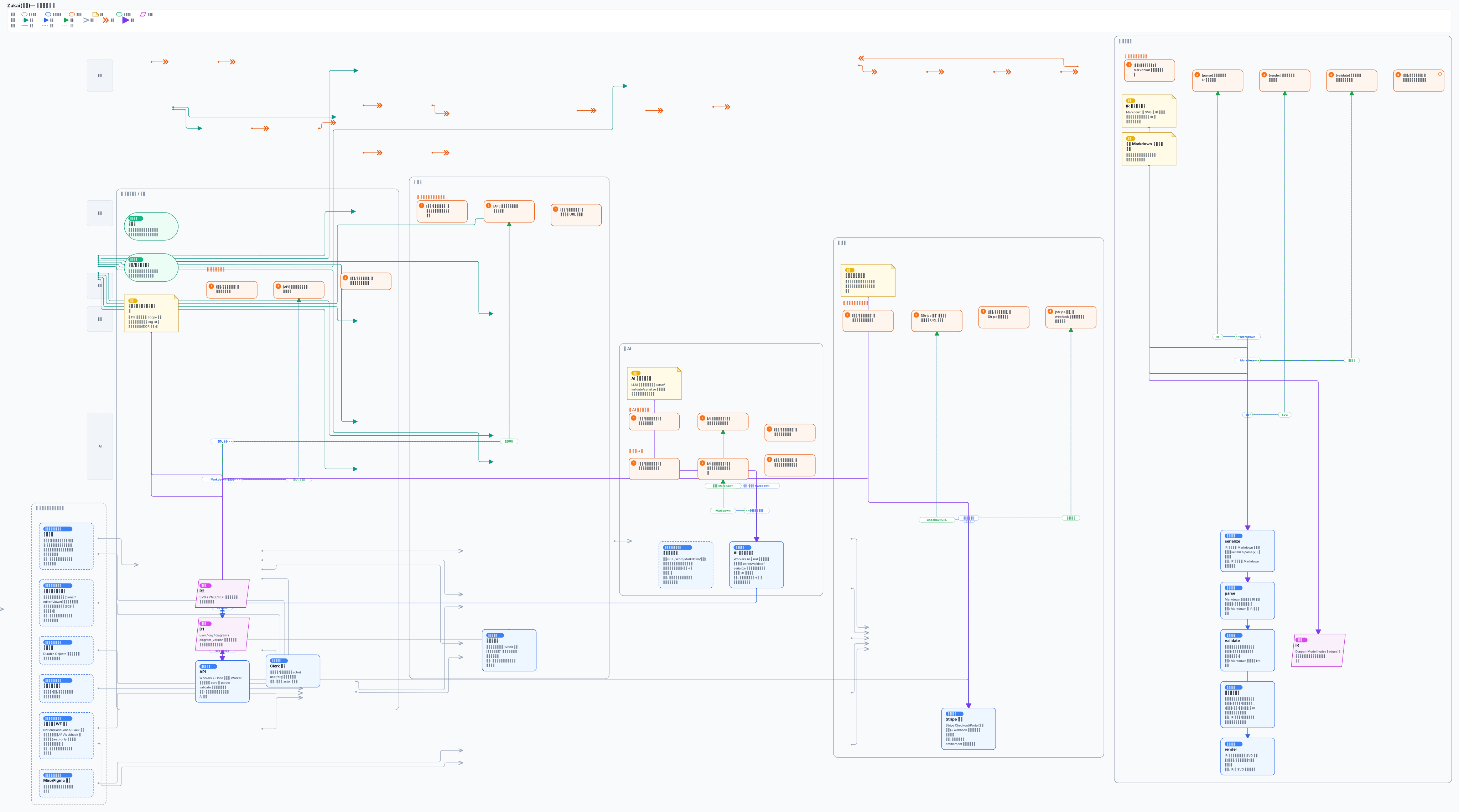
The full Zukai self model (scrollable)
Pricing
Start free. See the details in the app.
Pro Recommended
¥1,500/mo
For serious use. More diagrams, plus full AI, sharing, and version history.
See details in the appExport to SVG / PNG / PDF is always free, on every plan.
Planned A B2B plan for teams (shared management across an organization) is in the works.
Turn today's work into a single diagram.
Write it, paste it, let AI shape it. Free to get started.
Try it free